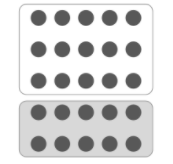
In the real world, a (or your client’s) company might have branding guidelines & design patterns in place. Top-down & left-right might be too simplistic. We can incorporate Gestalt principles to add a little flavour to the design.
What is Gestalt's Principle
The Gestalt Principles are a set of visual design laws arising from 1920s psychology. It described how humans typically see objects by grouping similar elements, recognizing patterns and simplifying complex images. Psychologists argued that these principles exist because the human mind has an innate disposition to perceive patterns based on certain rules. Examples of the principles are:
Proximity : States that “objects or shapes that are close to one another appear to form groups”.
Similarity : (also known as Invariance) — Humans tend to form relationship between similar elements within a design. Similarity can be achieved using basic elements such as shapes, colors, and size.
Closure : This refers to our tendency to complete an incomplete shape in order to rationalize the whole.
Continuity : Refers to how people tend to perceive each object as a single uninterrupted object.
Figure – Ground : Refers to how people tend to look for ways to differentiate between the figure and the ground.
Common Region : When objects are located within the same closed region, we perceive them as being grouped together.
For example, one can use simple lines now to guide users eyes, applying the principle of continuity & common ground to add texture and allow users to view it based on how one would like viewers to look at the page.
Your role as a visual designer is to guide users eyes. How else might you incorporate Gestalt principles to guide the readers and website users?
Making UI more Intuitive
STEPS
Sets a Goal
Sees the Starting Point
Performs the Action
Sees Results of Action
Proceeds if Successful. Return if Failed
QUESTIONS
In the context apt for me?
Is the starting point discoverable?
Do you/ we understand what to do with the starting point (affordance).
Do we Comprehend the language?
Can I predict what will happen next?
Do I see the response from the action?
Is the result what I expected?
If I make mistake can I go back? Did I understand the impact of the results?
Note : For each step, questions can be asked on the User Interface that reflect certain required attributes.
“If your target users must resort to reason, memorizing, experimenting, seeking help, or training, your UI isn’t intuitive by definition” “At each stage of the interaction lifecycle, we ask questions and look for certain attributes.”
Login
Accessing this course requires a login. Please enter your credentials below!